
Use People to manage individuals and organisations you work with. One record can have multiple roles. For example, if an organisation is both a customer and a supplier, you can assign both roles to the same record.
Create the record
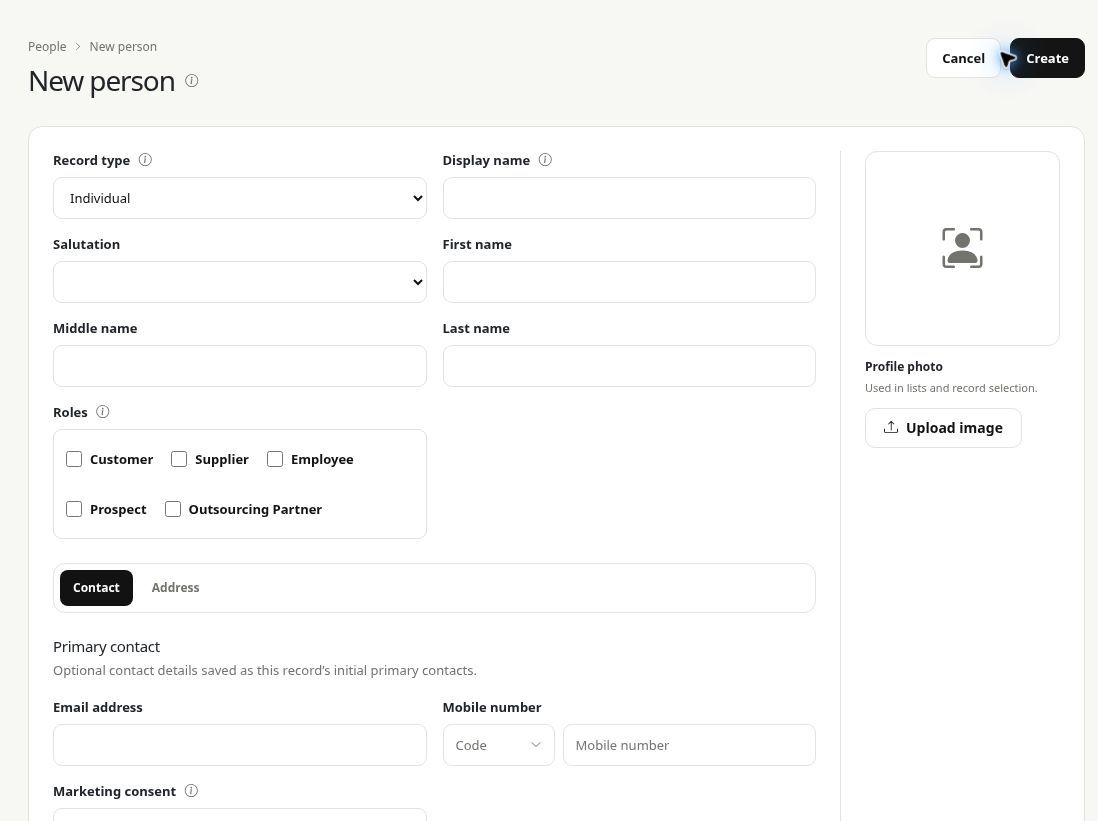
- Open People and search for the person or organisation. If the record already exists, open it and review its details and roles.
- Select Add person.
- Choose Individual or Organisation in Record type. For an employee, choose Individual.
- Enter a Display name your team will recognise. For an organisation, also enter the Organisation name.
- In Roles, select the roles that apply, such as Customer, Supplier or Employee.
- Use Contact to enter the primary email address or mobile number if you have them. Use Address if you want to enter a primary address now.
- Select Create.
Review or update the record
Open the saved record from People. Use Basic details to review its name and roles, and Addresses to manage saved addresses. If changes are submitted for approval, check the record again after the request has been reviewed.