
Start a payroll run in the location whose payroll you want to prepare. You’ll need an open payroll period before you can save the draft.
Enter the run details
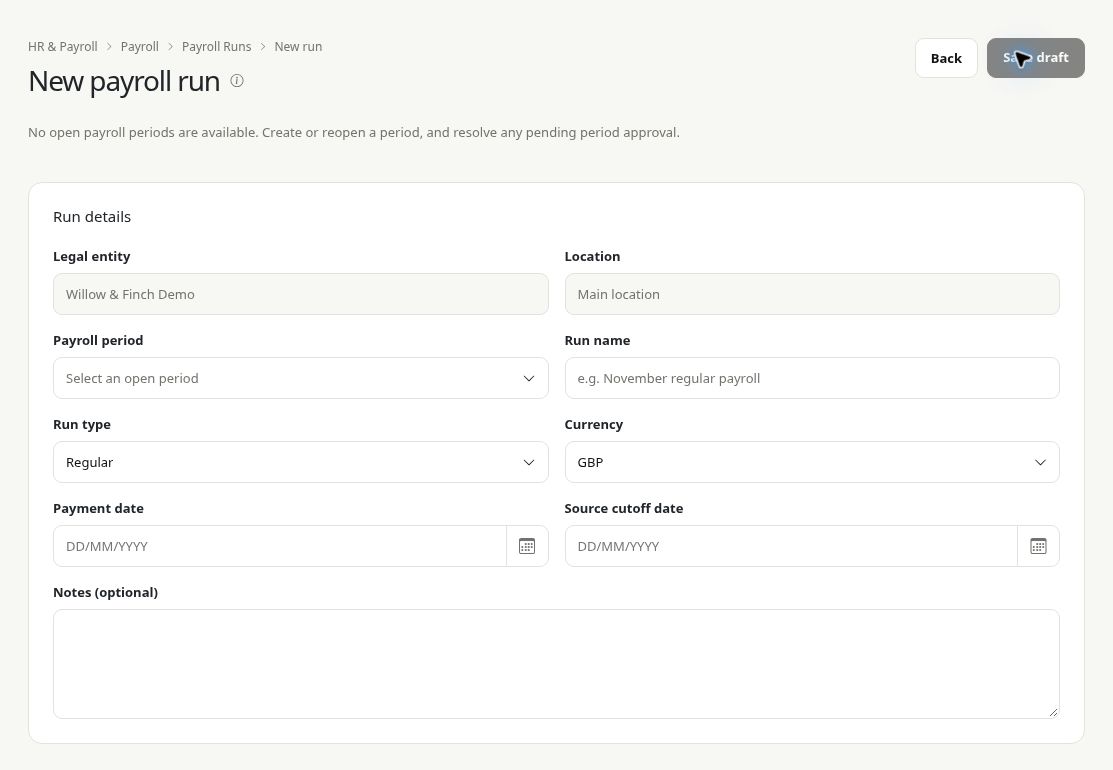
- Open HR & Payroll → Payroll → Payroll Runs and select New run.
- Check the Legal entity and Location shown on the form.
- Select an open Payroll period.
- Enter a Run name that identifies the payroll, such as November regular payroll. Check the Run type and Currency.
- Enter the Payment date and Source cutoff date. Add Notes if they will help the person reviewing the run.
- Select Save draft. Open the saved run to continue with calculation and review.
If no payroll periods are available
If the form says no open payroll periods are available, check that you are in the correct location. Create or reopen the period and resolve any pending period approval before returning to the run. If you cannot manage payroll periods, ask your payroll administrator to check the period’s status.