
Use Addresses to record the places associated with a person or organisation. For example, a customer may have a billing address for invoices and a shipping address for deliveries. Give each address a label that helps your team identify it.
Open the address list
- Open People and find the person or organisation. See Find a person or organisation for search tips.
- Open the record and go to Basic details → Addresses.
- Review the existing entries. If you’re correcting an address, open that entry for editing. If you’re adding a different site or address for another purpose, select Edit → Add address.
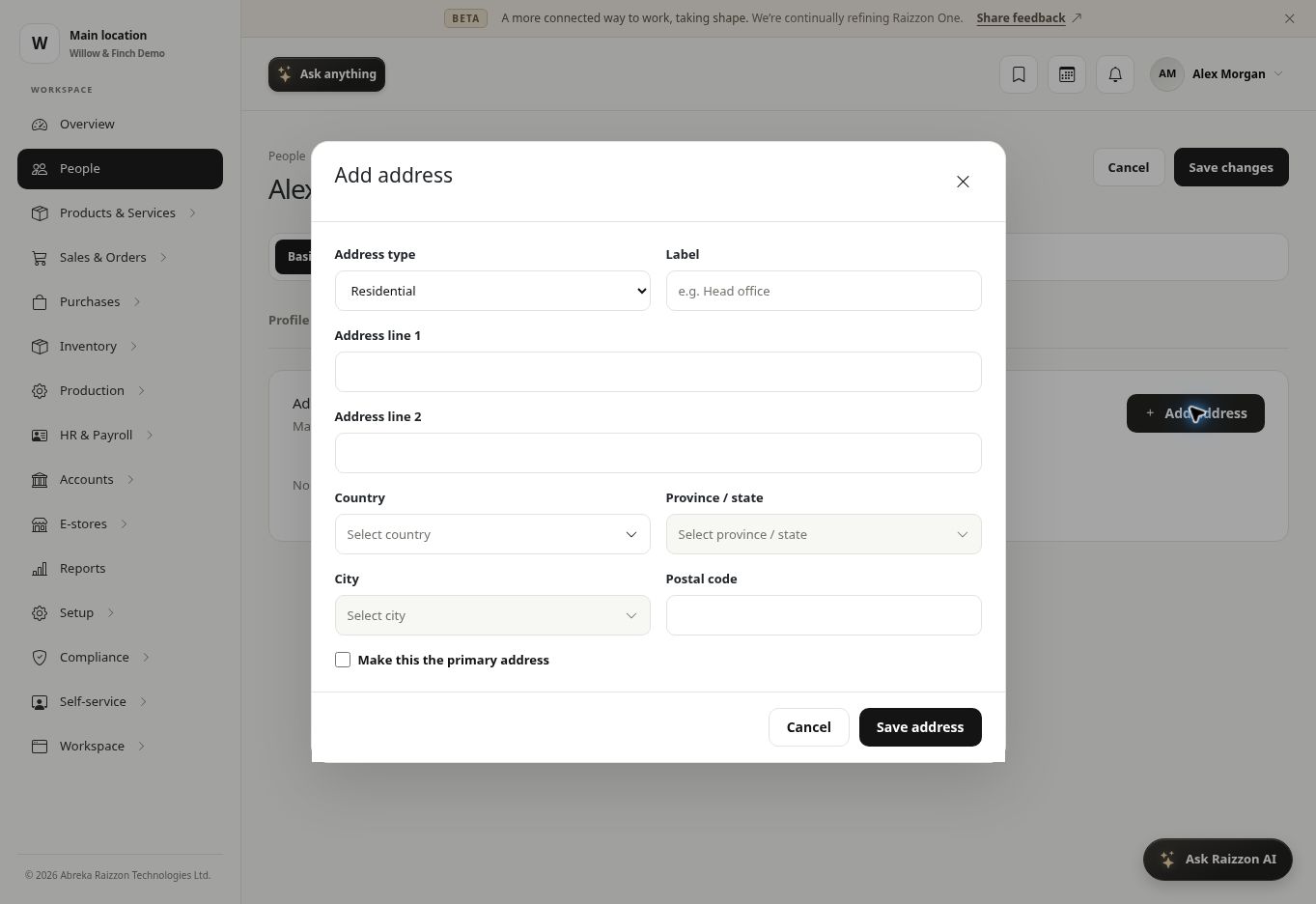
Choose the address type
| Address type | When to use it |
|---|---|
| Residential | The person’s home address. |
| Registered | The organisation’s registered address. |
| Billing | The address used for billing correspondence. |
| Shipping | The address where goods should be delivered. |
| Other | An address that serves another purpose. Use Label to describe it. |
Enter and save the address
- Enter a Label if it will help staff distinguish the address, such as
Bristol warehouseorHead office billing. - Enter Address line 1. Use Address line 2 for a unit, floor or other detail when needed.
- Select Country first, then complete Province / state, City and Postal code as applicable. If the province or city selector is disabled, check the country selection first.
- Select Make this the primary address for the address your team should use by default. For Indian GST billing, check that the primary address has the correct Country and Province / state. See the GST guidance below when the party has more than one address.
- Select Save address. This saves the address directly. Check the saved address type, label and state, and confirm that the intended address is marked as primary.
Check the primary address for Indian GST billing
Raizzon One uses address information to match configured GST components. For example, on a supplier bill, it uses the supplier’s primary address when checking country and state matches. A missing or incorrect state can prevent the expected GST components from being selected automatically.
- In People → Basic details → Addresses, open the customer or supplier address your team should use by default for billing. Check the country and state against the party’s billing or GST registration details, as applicable.
- Select Make this the primary address, save the address and confirm that the intended entry is marked as primary. Keep separate shipping addresses for deliveries where needed.
- Before confirming a sale or posting a supplier bill, review the address and GST breakdown on the transaction. For example, if the supplier’s location and the applicable place of supply are both in Odisha, a standard taxable supply generally uses CGST + SGST. If the supplier is in Odisha and the applicable place of supply is in West Bengal, it generally uses IGST.
- If the breakdown is unexpected, check the primary address, the address or place of supply applicable to the transaction, and your company’s GST setup before proceeding. This is especially important when the billing and shipping addresses are in different states.
If Add address is missing, check that the People record is in edit mode. If you can view the record but can’t edit it, ask your workspace administrator to check your access.