
Use Import defaults to start with a ready-made label you can edit. Choose a design based on where you’ll print it, what the label needs to show and the dimensions of your label stock.
Choose a starter design
- Open Setup → Documents, Printing & Labels → Label Designs.
- Select Import defaults.
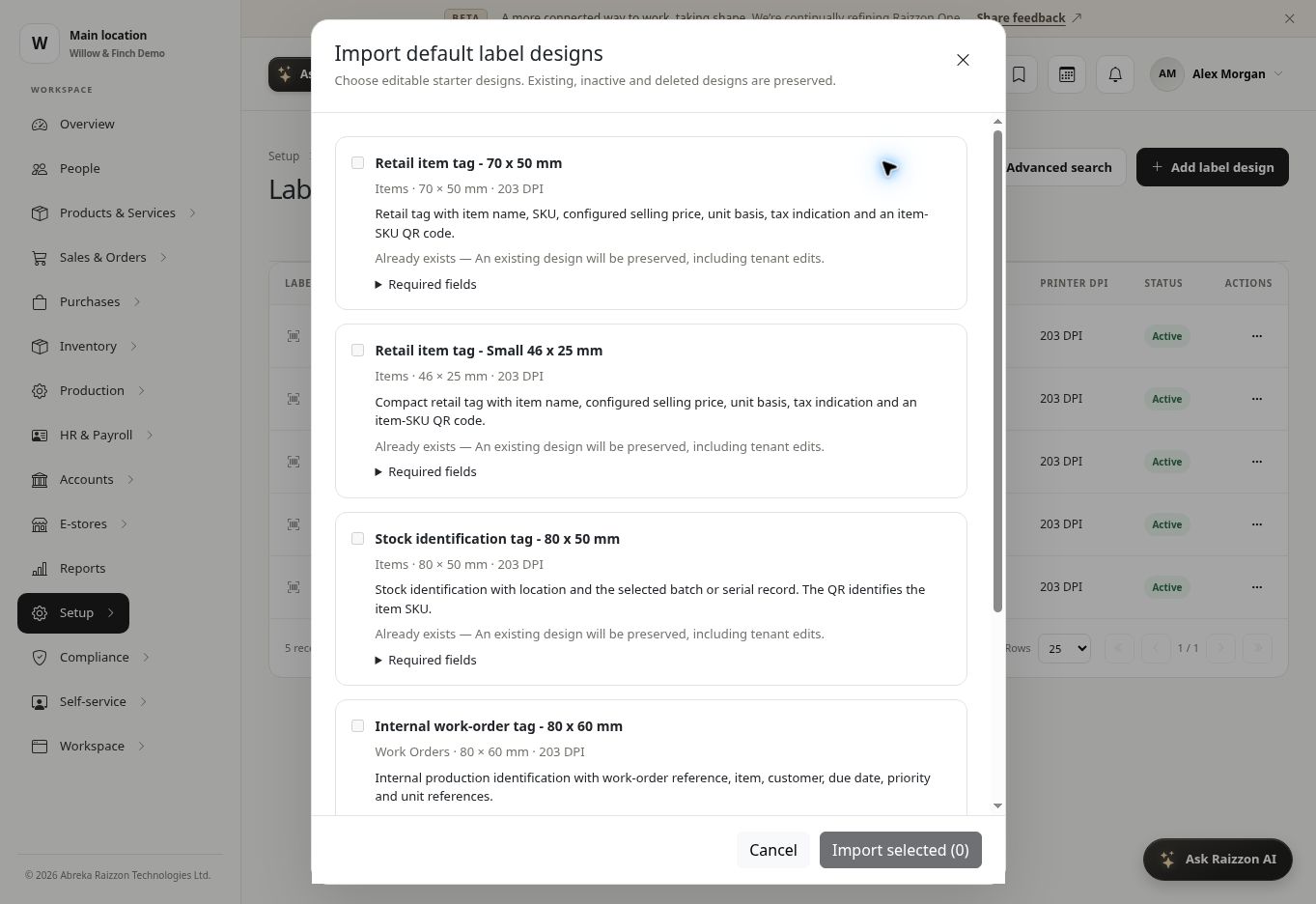
- In Import default label designs, compare each design’s module, size, printer resolution and description.
| Starter design | When to use it |
|---|---|
| Retail item tag, 70 × 50 mm | Use for a retail label with the item name, SKU, configured selling price, unit basis, tax indication and an item-SKU QR code. |
| Retail item tag – Small, 46 × 25 mm | Use for smaller stock when you need the item name, configured selling price, unit basis, tax indication and an item-SKU QR code. |
| Stock identification tag, 80 × 50 mm | Use to identify stock at a location, including the selected batch or serial record. The QR code identifies the item SKU. |
| Internal work-order tag, 80 × 60 mm | Use on the production floor to show the work-order reference, item, customer, due date, priority and unit references. |
| Customer collection and delivery tag, 80 × 50 mm | Use for collection or delivery identification with customer, item and order references. |
These starter designs are listed at 203 DPI. Check the label dimensions and printer resolution before choosing one.
Import and check the designs
- Tick the available designs you want. Check the number on Import selected before proceeding.
- Select Import selected.
- In Label Designs, find the imported design and check its module, size and status.
- Open the design to review it before use. In the operational module, preview a label using a sample record to check which values appear.
If a starter design is already present
Already exists means the workspace already has that design. Open it from Label Designs to review the existing version. Importing defaults preserves existing designs and any edits made to them. The import also preserves inactive and deleted designs.
If you need a different size or layout, see Create a label design.