
Operational policies control when certain actions happen in Raizzon One. For example, a sales policy can determine when a made-to-order sale creates a work order. When two locations behave differently, check the policy values for both sites.
Find the policy
- Open Setup → Operational Policies.
- Find the policy by its name and check the Module column. For example, Create work orders when belongs to Sales / POS.
- Review Tenant default, Configuration and Location override in the list. If Configuration shows Using core default, the workspace is using the built-in value for its tenant default.
- Select the policy name to open its record.
Check which value applies
- Under Policy settings, read the Core default and check whether the record says it is currently using that default.
- With Applies to set to Tenant default, check the displayed Value.
- Under Location overrides, look for the site you’re investigating. An override for that site takes precedence over the tenant default. A site without an override uses the tenant default.
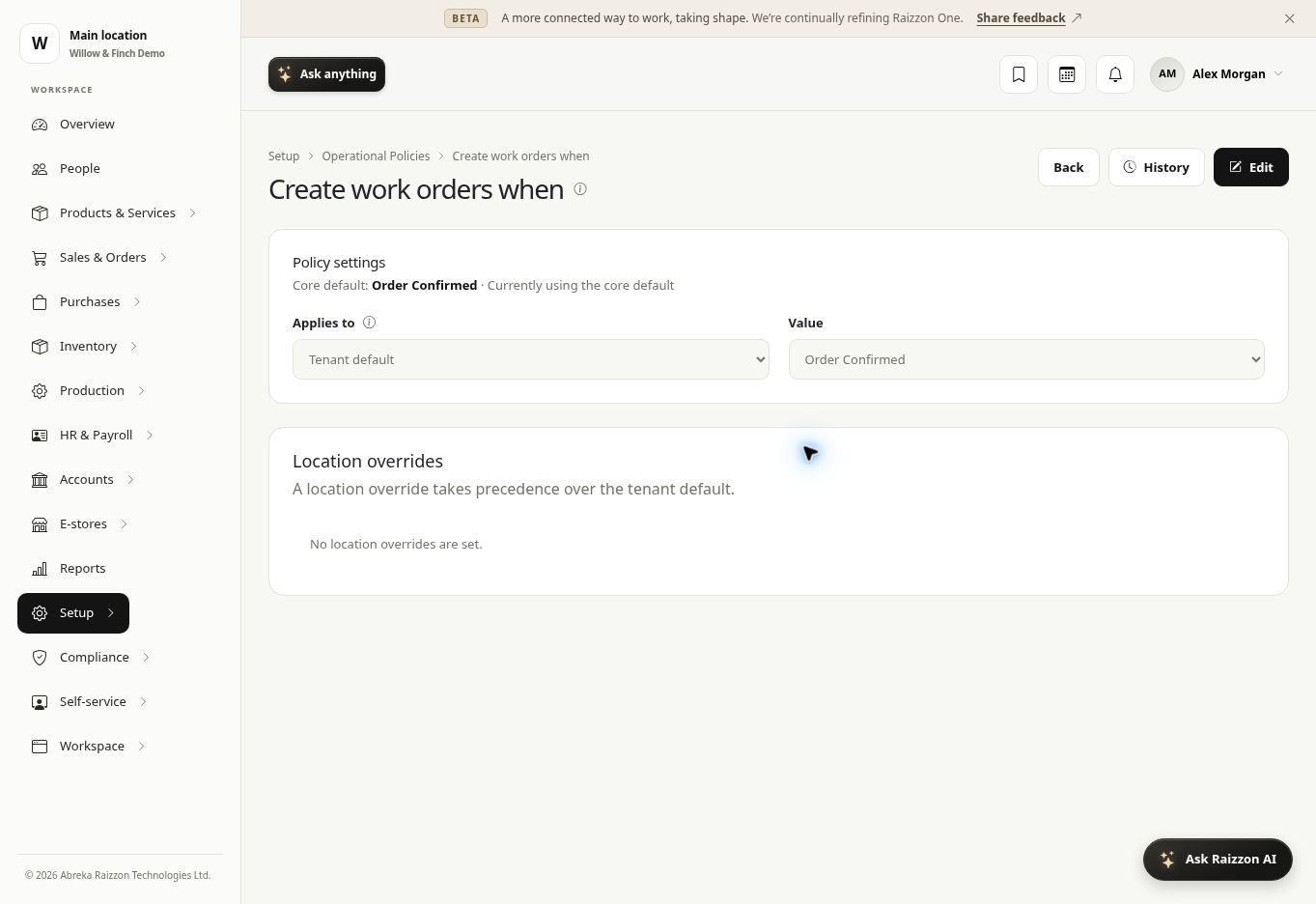
Example: When a work order is created
Open Create work orders when and check the value that applies to the sales location.
| Value | When the work order is created |
|---|---|
| Order Confirmed | When the sales order is confirmed. |
| Invoice Issued | When the invoice is issued. |
| Manual | When a user starts the work order from the sales window. |
For example, if the tenant default is Order Confirmed and one location uses Manual, staff at that location start the work order from the sales window. Other locations without an override follow the tenant default.
Use History on the policy record if you need to review earlier changes.